Owner
For you, and anyone who shares the business side.
- Everything an Admin can do
- Connect Stripe and manage payouts
- Make someone else an Owner
Ticketing for theaters, schools, clubs, gyms and anyone else running an event. Buyers pick their seats on a map of your actual room, and your full ticket price goes to your own Stripe account.
Free events are free, and signing up doesn't ask for a card.
At today's rate: 5% + $1.29 per paid ticket.
We charge 5% of the order plus $1.29 for each paid ticket. That already covers Stripe's standard card processing, so you won't find a second fee for it. Free tickets have no fee.
| Ticket price | Buyer pays | You get |
|---|---|---|
| $10.00 | $11.79 | $10.00 |
| $25.00 | $27.54 | $25.00 |
| $50.00 | $53.79 | $50.00 |
| $100.00 | $106.29 | $100.00 |
Switch on Poster Price for an event and our fee comes out of your ticket price, so buyers pay exactly what's on your poster. On a $25.00 ticket they pay $25.00 and you get $22.46. You decide event by event.
Try your own pricesStripe charges a few things on its own, and those come out of your Stripe balance: international cards, currency conversion and disputes. When you refund an order, the buyer gets everything back and we return our share of the fee, but Stripe keeps its processing fee.
Our fee includes card processing, and every ticket is charged on your own Stripe account, so you aren't paid after the event. We put the numbers side by side with Eventbrite, Ticket Tailor, Humanitix, Ticketleap and TicketSpice. Our first organizers get 5% + $0.65 per paid ticket, and keep it.
Compare side by sideBuild a map of your actual room once, then reuse it for every event you put on sale.
Rows, tables, standing areas, even a ball field. Buyers choose their exact seat.
Pick a ready-made theater, gym or arena layout, or start from a blank canvas.
A step-by-step wizard, then a short tour of the builder the first time you open it.
No assigned seats? Skip the map, sell a set number of tickets and show how many are left if you want to. Or sell a standing floor right beside your reserved seats.
Color-code sections and set a price for each one, event by event.
Basketball, baseball, soccer, hockey and more, each drawn with its own surface and markings.
This is where you draw your room. Below is one of our starting layouts, a theater, open in the builder, followed by every tool it has.
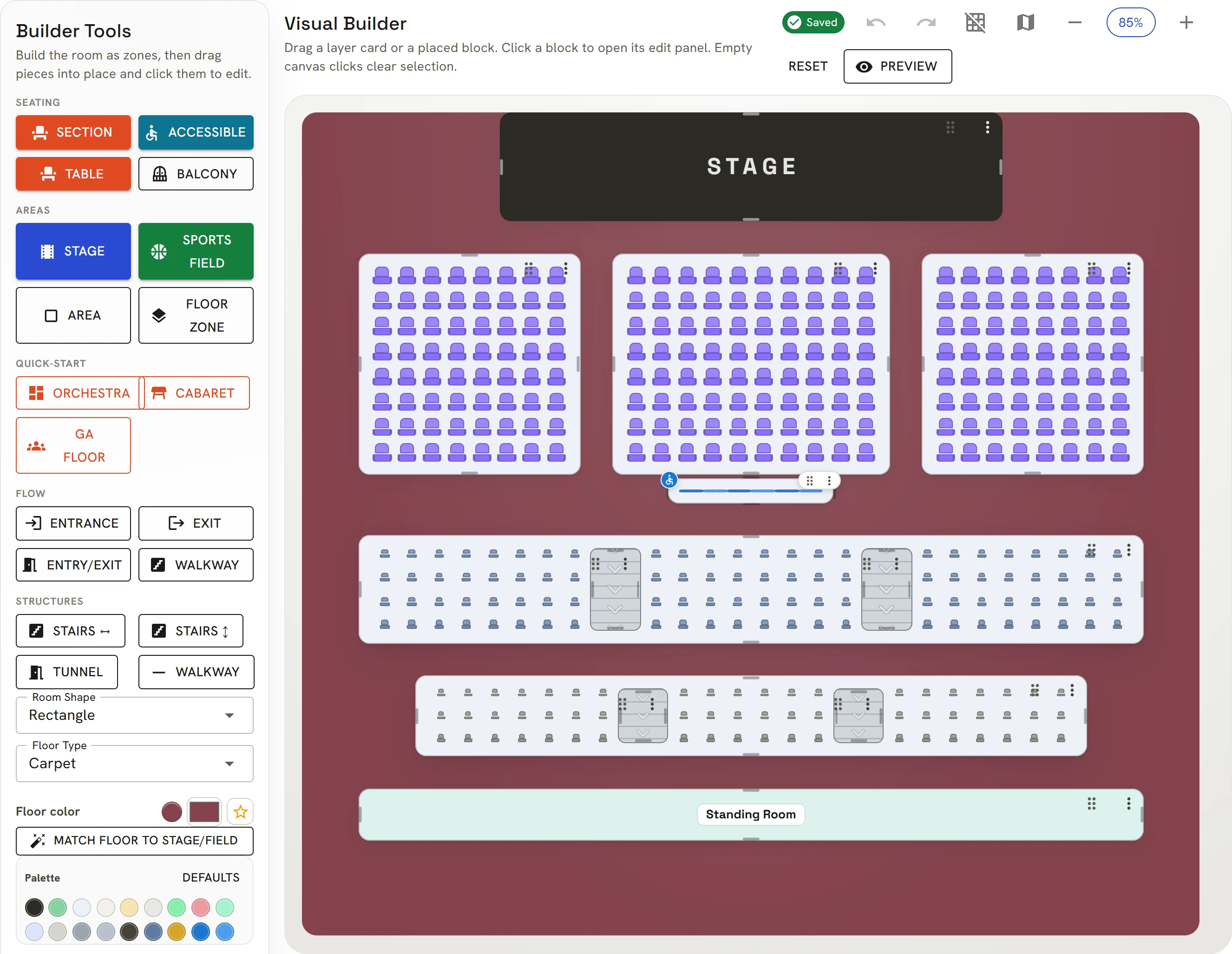
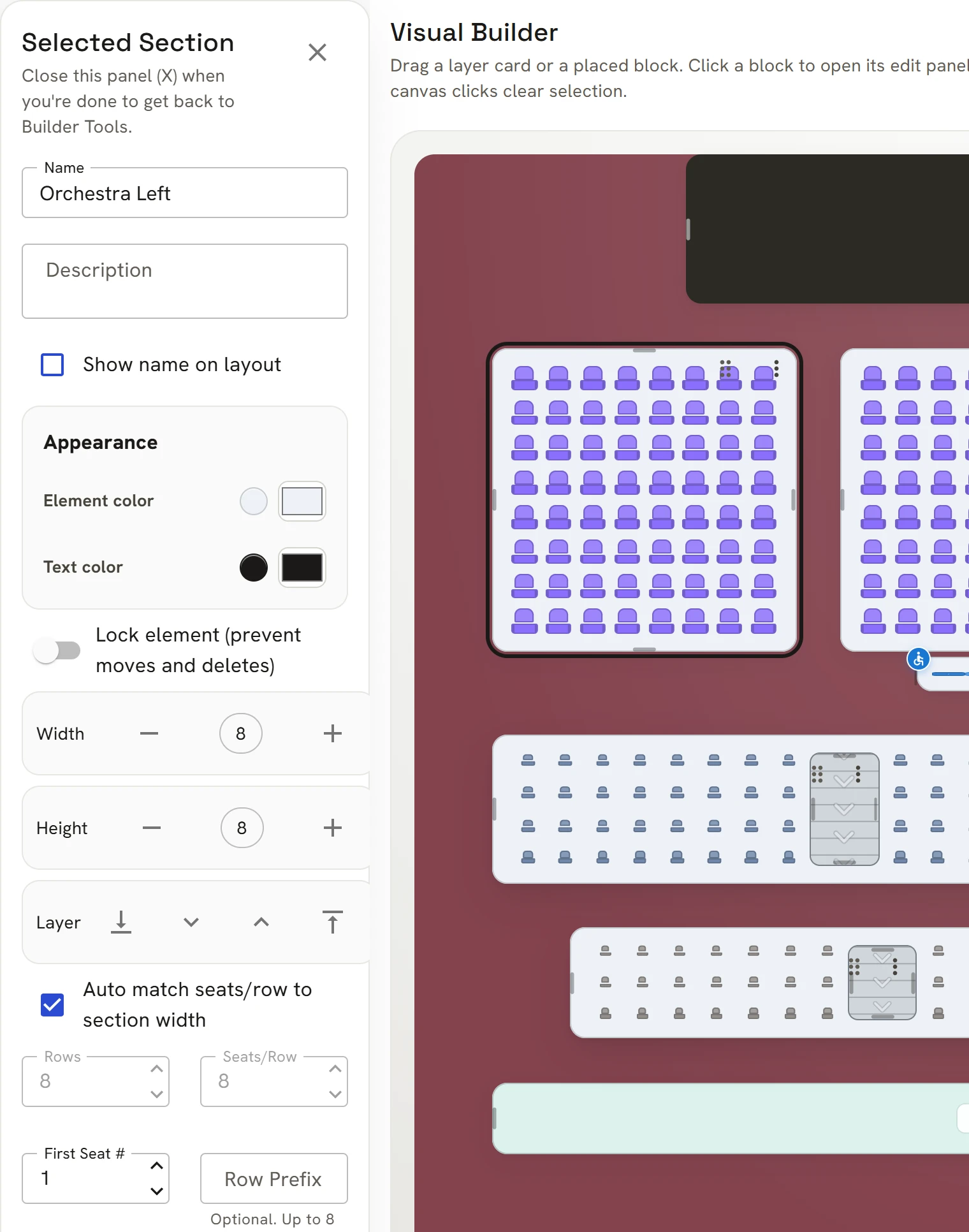
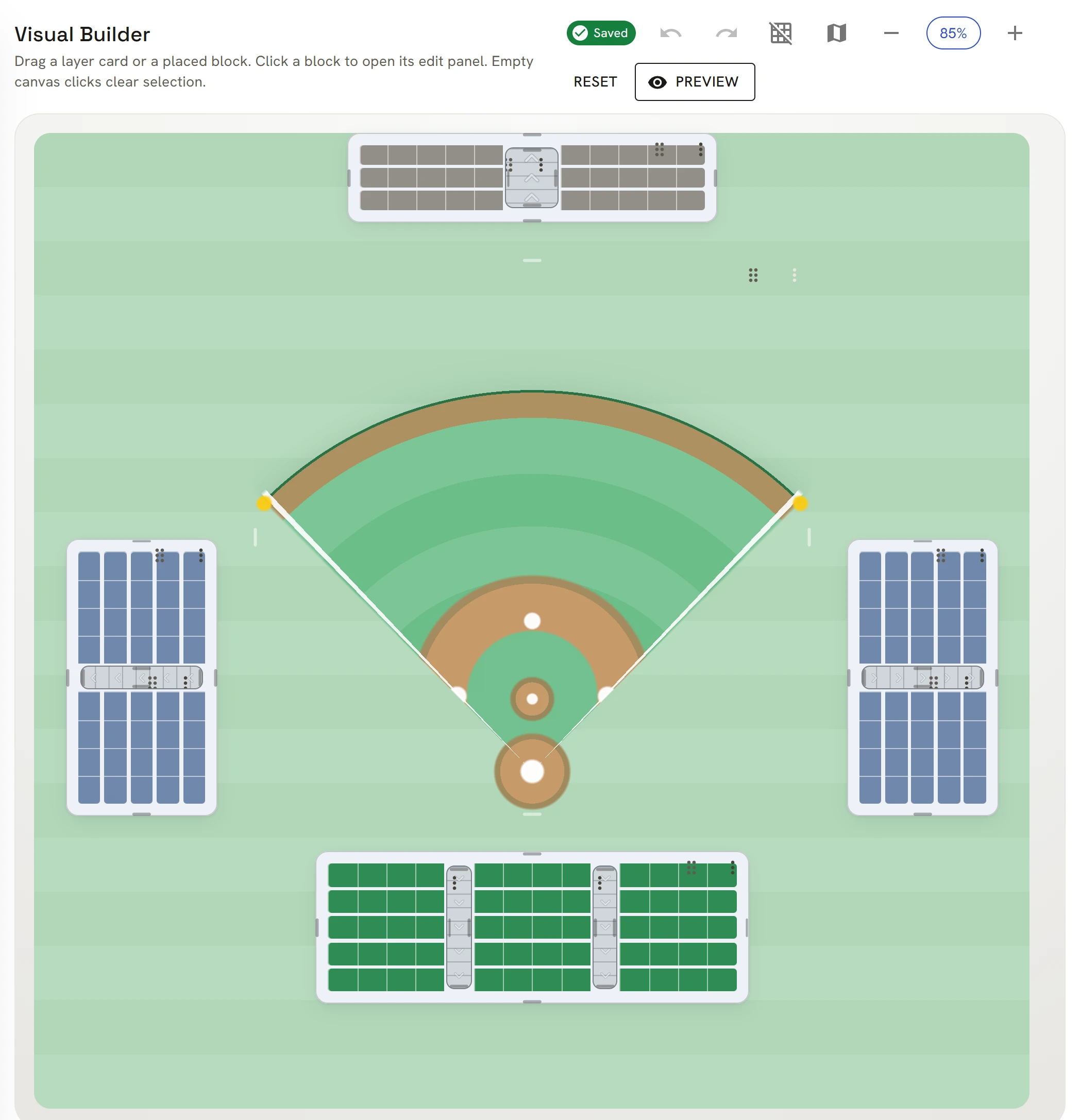
Want to see one up close? Every venue in the demo was drawn in this builder.
Decide when tickets go on sale, who can buy them, and what else goes in the basket.
Pick the minute sales open and close, in your venue's time zone.
Cap how many tickets one buyer can buy, and how many seats they can hold at once.
Discount codes with use limits and expiry dates.
Parking, a program, a drink ticket. Sold right in checkout.
Standing discounts for your regulars, each with their own member code.
Keep an event off your page and send each guest a personal link with their own limit.
Put every date of a run into one series. Buyers see one listing and pick their night.
Sold out? Buyers join a waitlist and hear from us when a seat opens up.
Take seats off sale for sponsors or the band, then put them on sale or hand them out later.
Your page, your colors, your poster. Buyers can tell they're buying from you.
An organization page in your colors that lists everything you have on sale.
Pick a look, your colors and a cover photo if you like. Every text tone stays readable in light and dark mode.
Add a poster to each event. It shows on your page, on event cards and in link previews.
Design your tickets front and back, from a template or a blank canvas, and give an event or a seating category its own. They fit any phone and print at home.
Your website or socials, shown on your page and under your name on every event.
Parking, entrances, what to bring. Sent with every ticket.
Every buyer gets a ticket, so make it yours. Design the front and the back in your colors, with your logo and a QR code in your own style. Start from a template or a blank ticket, and give any event or seating category a look of its own. There's no extra charge.
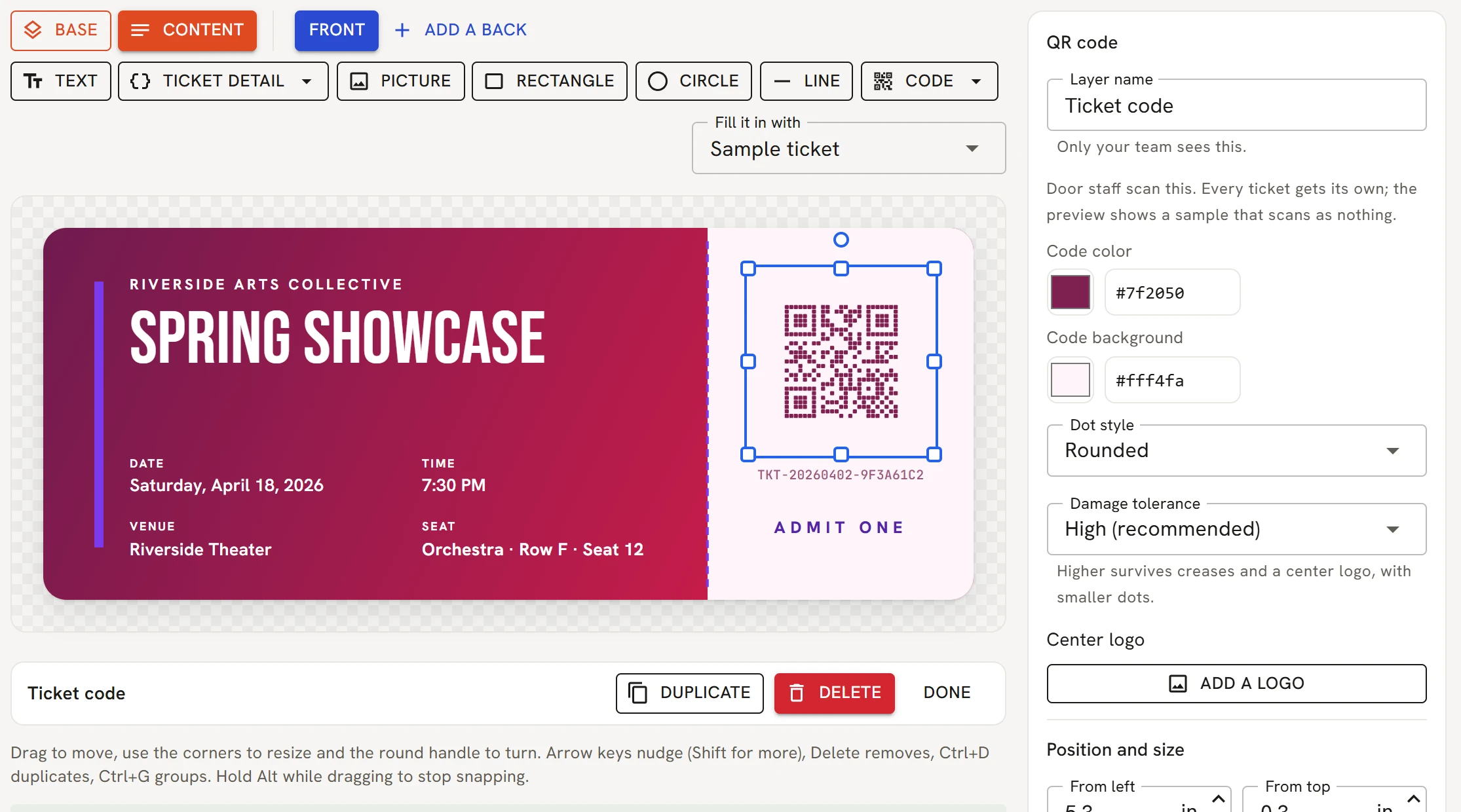
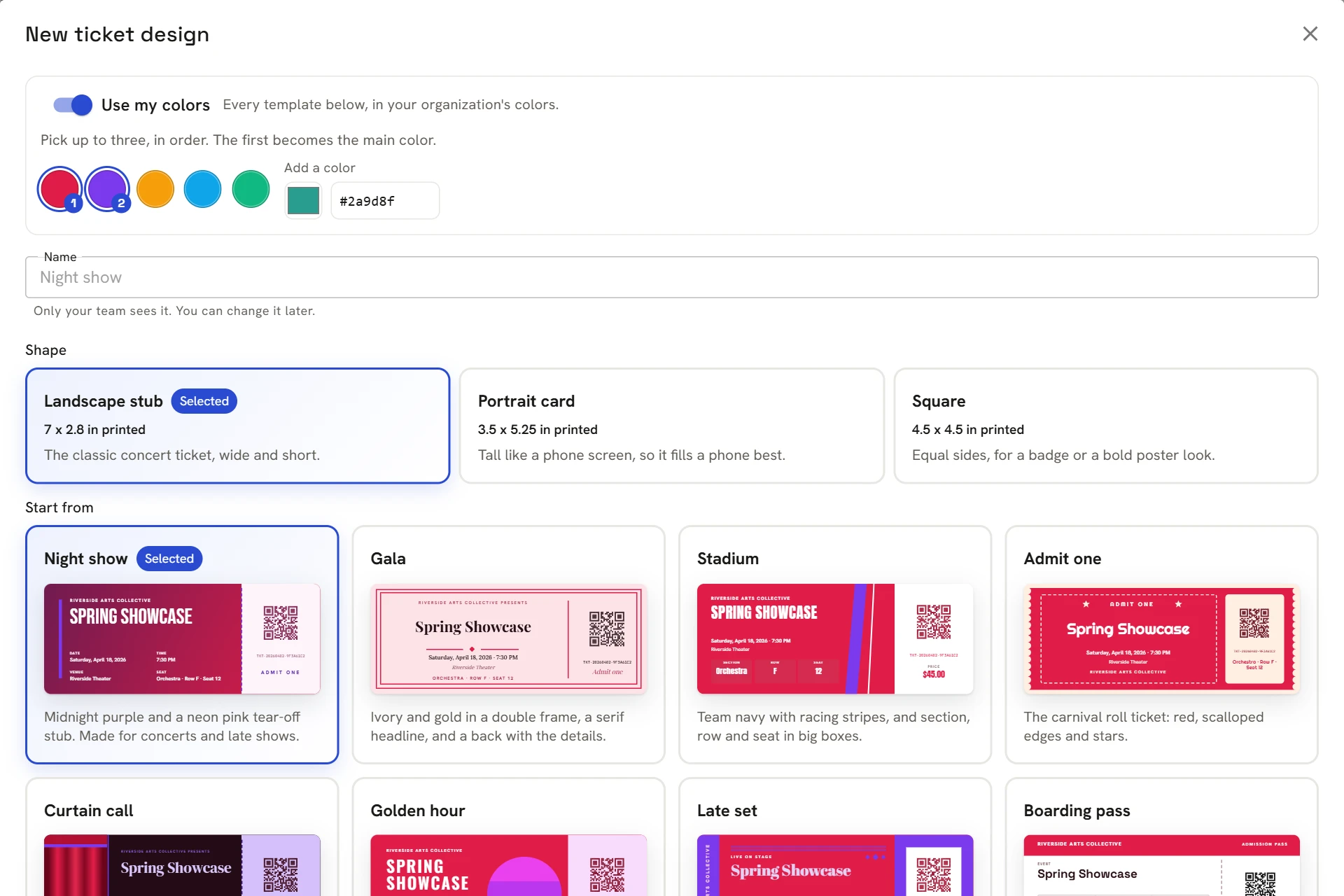
Every ticket a buyer opens on their phone, or prints, is drawn from the design you make here.
One fee with card processing included, and the money lands in your own Stripe account.
Connect Stripe once from your Payouts page. Every ticket is charged on your own account, so your money never sits with us.
5% + $1.29 per paid ticket, standard card processing included. Free tickets have no fee.
Our fee comes out of your ticket price, so buyers pay exactly what's on your poster.
Buyers see your organization's name on their card statement.
Running a free event? You don't need Stripe at all.
Every order shows exactly what you receive.
Refund any order. The buyer's tickets stop working at the door.
Cancelling an event refunds every order and emails each buyer.
Scan tickets and sell to walk-ups from the phones and tablets you already have.
Door staff scan with a phone camera. A ticket only gets in once.
Sell at the door by cash or card, with separate door prices if you want them.
Print a QR sign so walk-ups can buy on their own phone. Same fee as online.
Turn a tablet into a locked ticket kiosk with an exit PIN. Buyers pay by card, same fee as online.
Cash, and cards you charge on your own card machine, carry no platform fee and work before you connect Stripe.
Add a Stripe card reader and buyers tap or insert their card at the door or the box office. Same fee as online.
Give comps, keep a guest list, or record tickets you sold for cash, by check or on your own card machine, with no fee.
Door staff find the tickets you issued by the name on them.
A clear checkout sells more tickets, and fewer people email you asking where theirs went.
Buy a demo ticketBuyers see the total, fee included, before they pay.
Checkout works well on a phone, with Apple Pay and Google Pay where the device has them.
Tickets come by email, with one link that opens every ticket in the order.
Buyers can pass a ticket to a friend, and the old copy stops working.
Find my tickets sends them again to the buyer's email, so fewer of those requests land with you.
No ads and no tracking cookies. Your event page never promotes anyone else's event.
Orders, sales and your team in one place, with the right people holding the right keys.
Sales, a 30-day revenue trend and the cash taken at the door.
Find any order, refund it from the same screen, and export everything to a spreadsheet.
Invite the people who help you, each with a role that fits. Who can do what is just below.
Duplicate an event into a new draft with the same venue and settings, then give it a new date.
Invite people by email from your organization's page. They choose their own password from the link, and the role you give them decides what they can open. Change a role or remove someone any time.
For you, and anyone who shares the business side.
For a co-organizer or box office manager.
Not payouts, and they can't change or remove an Owner.
For staff and volunteers who set things up.
Not payouts, refunds, the box office or the team.
For the people working your doors.
Nothing else: no orders, buyer lists, dashboard or settings.
We look over every new organizer account ourselves, usually within one business day.
Add your venue from a template or keep it general admission, then set your prices.
Paid tickets need Stripe connected on your Payouts page. Free events can go live right away.
Yes. The demo is the real product with made-up events. Pick seats and go all the way through checkout. Nothing is charged.
No. You pay the per-ticket fee on paid tickets and nothing else. There are no plans or tiers: every account gets everything on this page.
Only when the card goes through Eventrika. Buying on the door sign or the kiosk, a card your staff type in, and a Stripe card reader all pay the same fee as online. Cash, checks and cards you charge on your own machine outside Eventrika, like Square or the venue's terminal, have no fee.
You do. Refund any order from your Orders page. The buyer gets their money back and their tickets stop working at the door.
No. They check out with an email address and can look their tickets up later on Find my tickets.
Seat maps are made for small and mid-size rooms, up to around 1,200 assigned seats. General admission events can be much bigger.
All of it comes with every account. Create one and set up your first event. Nothing goes live until you publish it.
Questions first? Ask us on the support page.